

 Support
Configurations
Installation
Enhance your NPC's dialogue with our NPC avatar configuration series, which includes Citizens, CharacterDialogue, Oraxen, and ItemsAdder.
All NPC Avatars Volumes share the same format, installation, and usage method. You will use this page for general information about all Volumes, and for details on specific NPCs and Skins, please refer to the subpages of each Volume.
Dependencies
| Name | Link | Version | Required |
|---|---|---|---|
| Citizens2 | Download | Latest | Optional |
| CharacterDialogue | Download | Latest | Optional |
| MythicMobs | Download | Latest | Optional |
| Lib's Disguises | Latest | Optional | |
| ItemsAdder | Purchase | Latest | See WARN below |
| Oraxen | Purchase | Latest | See WARN below |
Oraxen and ItemsAdder: you only need one for your server to use our configuration package. ItemsAdder is highly recommended.
Installation
Before following the installation tutorial, make 100% sure that you have a backup in case something goes wrong.
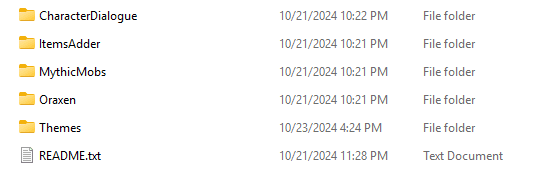
This is the package after you download and unzip it. Basically, there are two methods to set up these NPCs on your server: first, using Citizens (recommended), and second, using MythicMobs. You only need one of these methods.
Method #1 - Using Citizens2
Method #2 - Using MythicMobs
Tutorial Commands:
/savedisguise NPC_<name> player <inherit> setSkin <SKIN-URL> setDynamicName
Last updated on