

 Support
Configurations
Installation
With a simple and closely aligned aesthetic to Vanilla Friendly Minecraft, this will be the only resource you need to elevate the custom enchant playstyle of your server.

- BuiltByBit: https://builtbybit.com/resources/25414
- Polymart: https://polymart.org/resource/2992
- Video Showcase: https://www.youtube.com/watch?v=Q-VcY98Qltg
Requirements
| Name | Link | Version | Required |
|---|---|---|---|
| AdvancedEnchantments | Purchase | Latest | Yes |
| ItemsAdder | Purchase | Latest | [ See Caution ] |
| Nexo | Purchase | Latest | [ See Caution ] |
| DeluxeMenu | Download | Latest | Yes |
| PlaceholderAPI | Download | Latest | Yes |
| CloseInventoryCmd | Download | Latest | Optional |
[ Caution ]
ItemsAdder, Nexo - you only need one for your server to use our configuration package. ItemsAdder are highly recommended.
Installation
Before following the installation tutorial, make 100% sure that you have a backup in case something goes wrong.
-
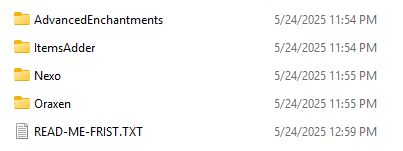
After you download the package, you will simply have 5 folders: AdvancedEnchantments, ItemsAdder, Nexo, Oraxen, DeluxeMenu and PlaceholderAPI
-
If your server uses ItemsAdder, you can skip the Nexo, Oraxen folder, and vice versa. Note that you only need one of those three plugins.
-
Stop your server, copy AdvancedEnchantments, DeluxeMenu, PlaceholderAPI and ItemsAdder/Nexo/Oraxen folder to your server plugins folder.
-
Restart your server, after you logged in your server, use the command below to zip and apply all the changes.
- For ItemsAdder users: /iazip - For Nexo users: /n reload all - For Oraxen users: /o reload all
-
Enjoy!
Last updated on